Spring + Java21에서 Grafana + Prometheus 운영 모니터링 가이드
운영하다 보면 결국 이 질문으로 돌아오더라.
- 지금 서비스 정상 맞나?
- 느려지면 어디부터 봐야 하나?
- 알람은 빨리 오고, 원인 파악은 가능한가?
이번 글은 Spring Boot(Java 21) 기준으로,
Prometheus + Grafana를 실제 운영에서 쓰는 기본 뼈대를 정리한 글이다.
핵심은 4가지다.
- 메트릭 노출(Actuator + Micrometer)
/actuator운영 보안- Prometheus 수집 설정
- Grafana 대시보드/알람 설계
1) 전체 흐름 먼저 한 장으로 보기
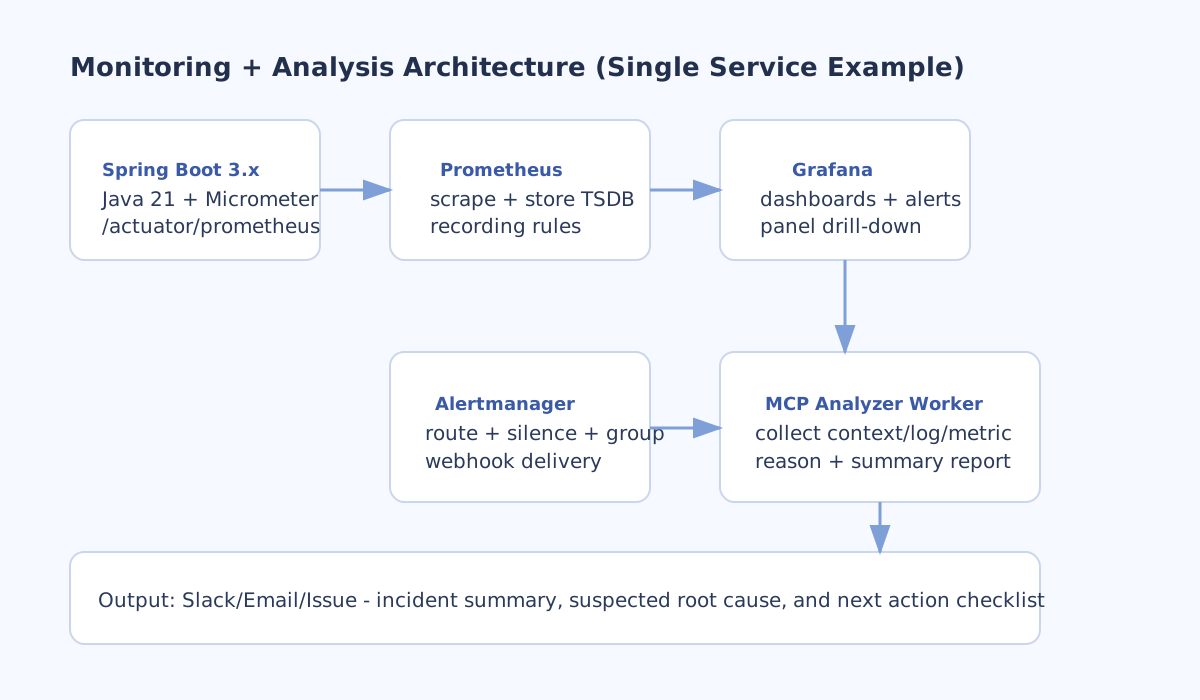
구조 자체는 어렵지 않다.
- Spring Boot 앱이
/actuator/prometheus로 메트릭 노출 - Prometheus가 주기적으로 scrape
- Grafana가 Prometheus를 조회해서 시각화
- Grafana Alerting으로 경보 발행
여기서 포인트는 도구를 많이 붙이는 게 아니라,
초기 지표를 작게 시작하고 정확하게 보는 것이다.
2) Spring Boot(Java 21)에서 메트릭 노출
2-1. 의존성
dependencies {
    implementation("org.springframework.boot:spring-boot-starter-actuator")
    runtimeOnly("io.micrometer:micrometer-registry-prometheus")
}
2-2. endpoint 설정
management:
  server:
    port: 18081
  endpoints:
    web:
      exposure:
        include: health,info,prometheus
  endpoint:
    health:
      probes:
        enabled: true
management.server.port 분리는 나중에 보안 정책 잡을 때 진짜 편하다.
2-3. 커스텀 메트릭 예시
@Component
public class SermonMetrics {

    private final Counter sermonCreateCounter;
    private final Timer sermonPublishTimer;

    public SermonMetrics(MeterRegistry registry) {
        this.sermonCreateCounter = Counter.builder("cms_sermon_create_total")
                .description("Total created sermons")
                .register(registry);

        this.sermonPublishTimer = Timer.builder("cms_sermon_publish_seconds")
                .description("Sermon publish latency")
                .publishPercentiles(0.5, 0.95, 0.99)
                .register(registry);
    }

    public void incrementCreate() {
        sermonCreateCounter.increment();
    }

    public <T> T recordPublish(Supplier<T> supplier) {
        return sermonPublishTimer.record(supplier);
    }
}
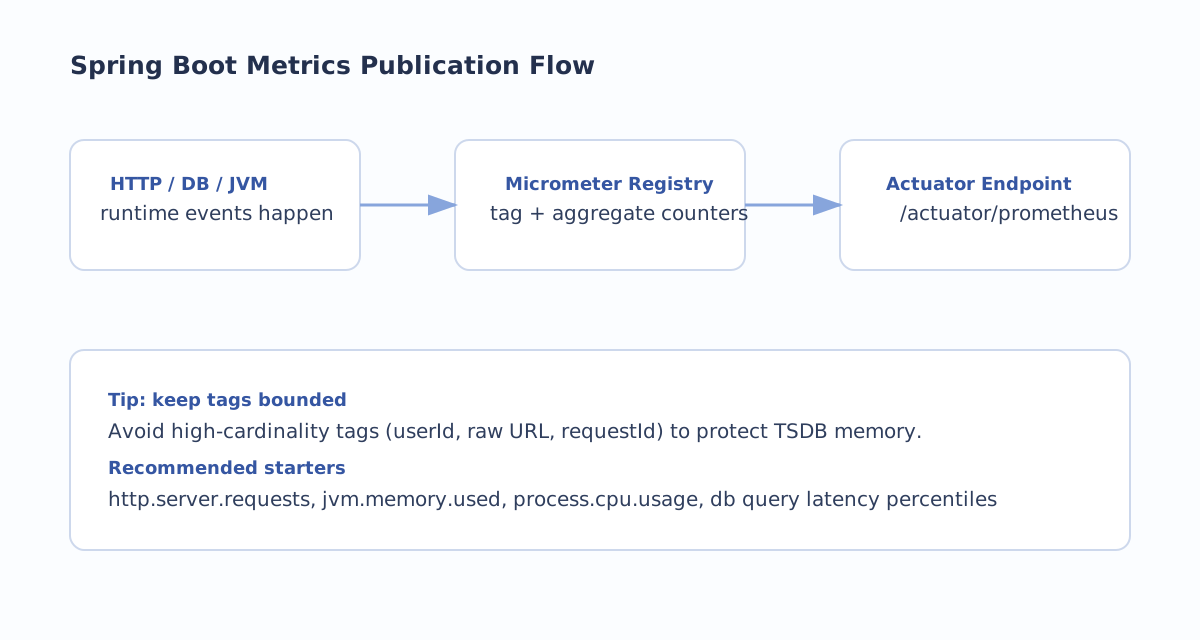
실무에서 제일 많이 터지는 건 태그(cardinality)다.
userId,requestId, raw URL 같이 값이 계속 늘어나는 태그는 피하기method,status,uri처럼 범위가 제한된 태그 위주로 쓰기
카디널리티가 커지면 Prometheus 메모리/쿼리 비용이 생각보다 빨리 올라간다.
3) 운영 보안: /actuator는 내부망 전용
이건 거의 원칙에 가깝다.
운영에서 /actuator를 퍼블릭으로 열어두면 안 된다.
권장 패턴은 이렇다.
- 앱 포트와 관리 포트 분리
- Security Group에서 Prometheus 서버(또는 내부 SG)만 허용
- 외부 인터넷에서 management 포트 차단
- endpoint 최소 공개(
prometheus,health,info)
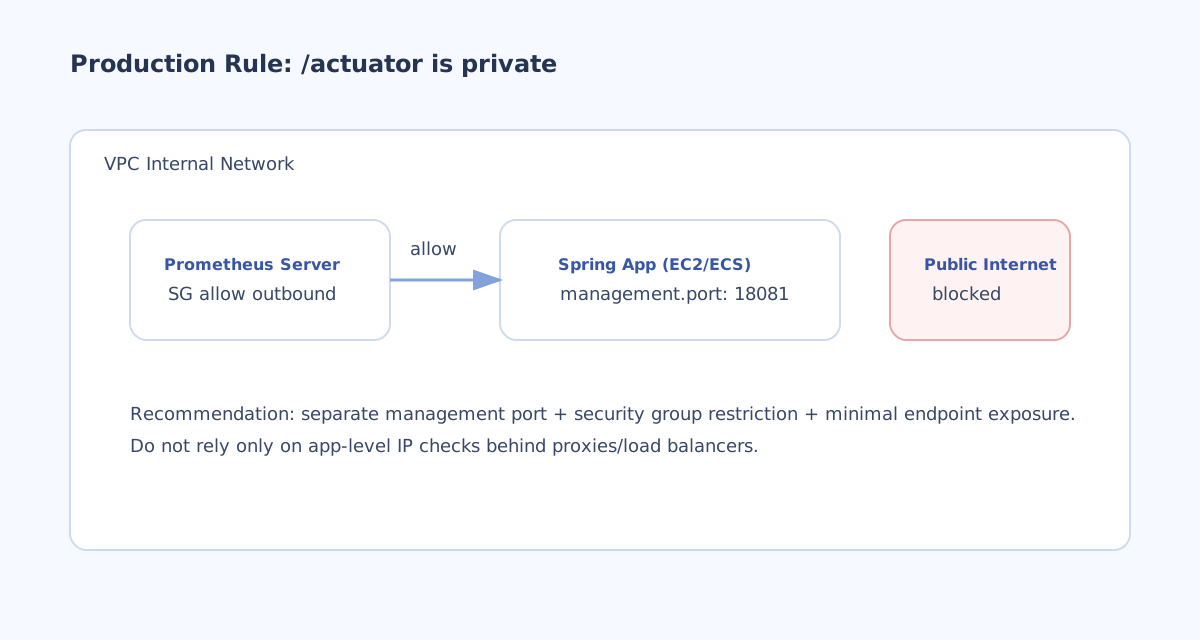
앱 코드에서 IP 필터만 거는 방식보다,
네트워크 레벨에서 먼저 막는 구조가 훨씬 안전하다.
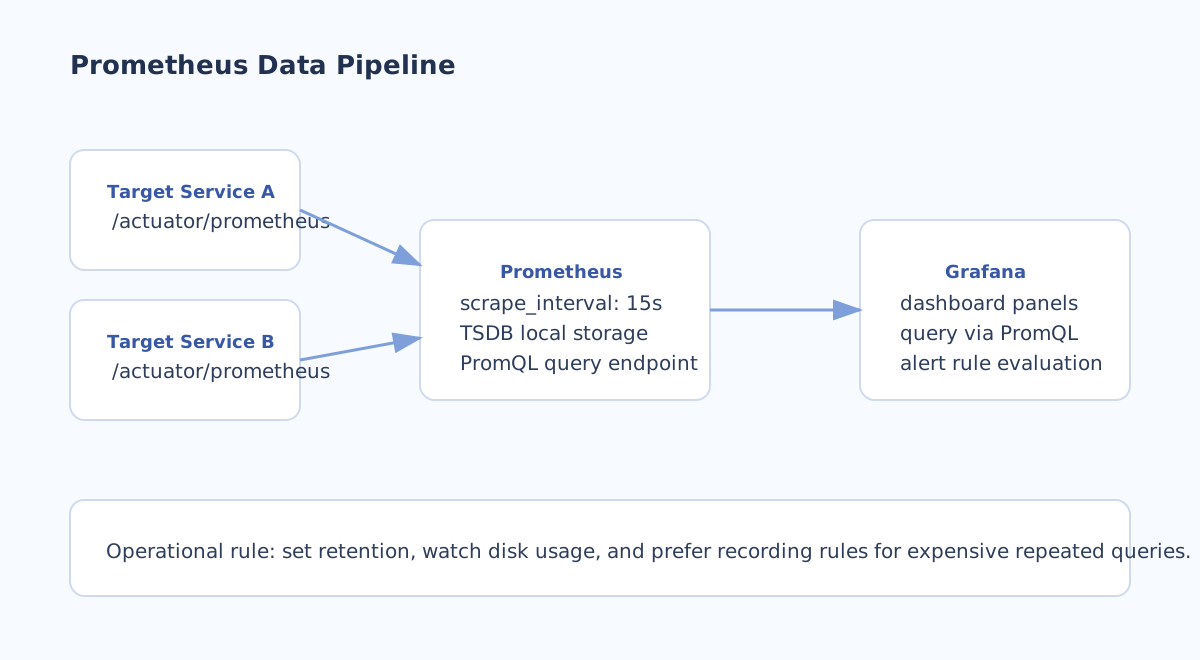
4) Prometheus 수집 설정
처음 시작할 때는 아래 정도면 충분하다.
global:
  scrape_interval: 15s

scrape_configs:
  - job_name: "bssj-web-backend"
    metrics_path: "/actuator/prometheus"
    static_configs:
      - targets: ["host.docker.internal:18081"]
주의할 점:
host.docker.internal은 로컬/도커 개발용 예시- EC2/ECS/K8s 운영에서는 내부 DNS 또는 서비스 디스커버리 경로 사용
운영에서는 보통 이렇게 시작한다.
- scrape interval:
15s또는30s - retention/디스크 사용량 같이 모니터링
- 반복적으로 무거운 쿼리는 recording rule 고려
5) Grafana 대시보드: 처음부터 크게 만들 필요 없다
초기에는 아래 4축만 제대로 봐도 충분하다.
- Request Rate (RPS)
- Error Rate (5xx 비율)
- Latency p95/p99
- JVM/CPU/메모리 + DB pool
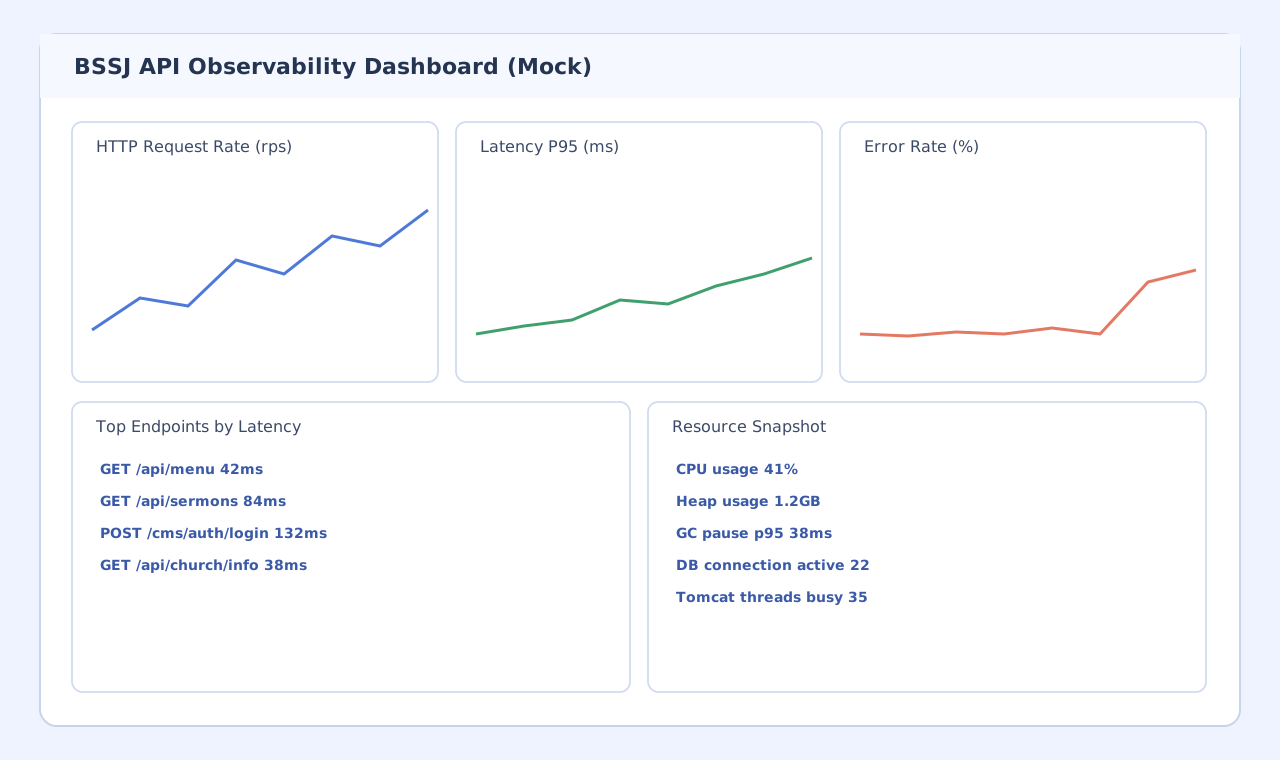
자주 쓰는 PromQL 예시:
sum(rate(http_server_requests_seconds_count{uri!="/actuator/prometheus"}[5m]))
histogram_quantile(
  0.95,
  sum(rate(http_server_requests_seconds_bucket[5m])) by (le)
)
sum(rate(http_server_requests_seconds_count{status=~"5.."}[5m]))
/
sum(rate(http_server_requests_seconds_count[5m]))
패널 추가 기준은 단순하다.
“장애 났을 때 원인 좁히는 데 실제로 도움 되냐” 이것만 보면 된다.
6) 알람 설계: 임계치보다 노이즈 관리가 더 중요
예시 룰(지연 p95 700ms 초과가 10분 지속):
groups:
  - name: latency-alerts
    rules:
      - alert: ApiLatencyP95High
        expr: histogram_quantile(0.95, sum(rate(http_server_requests_seconds_bucket[5m])) by (le)) > 0.7
        for: 10m
        labels:
          severity: warning
          service: bssj-web-backend
        annotations:
          summary: "API latency p95 is above 700ms"
          runbook: "https://internal.wiki/runbooks/api-latency"
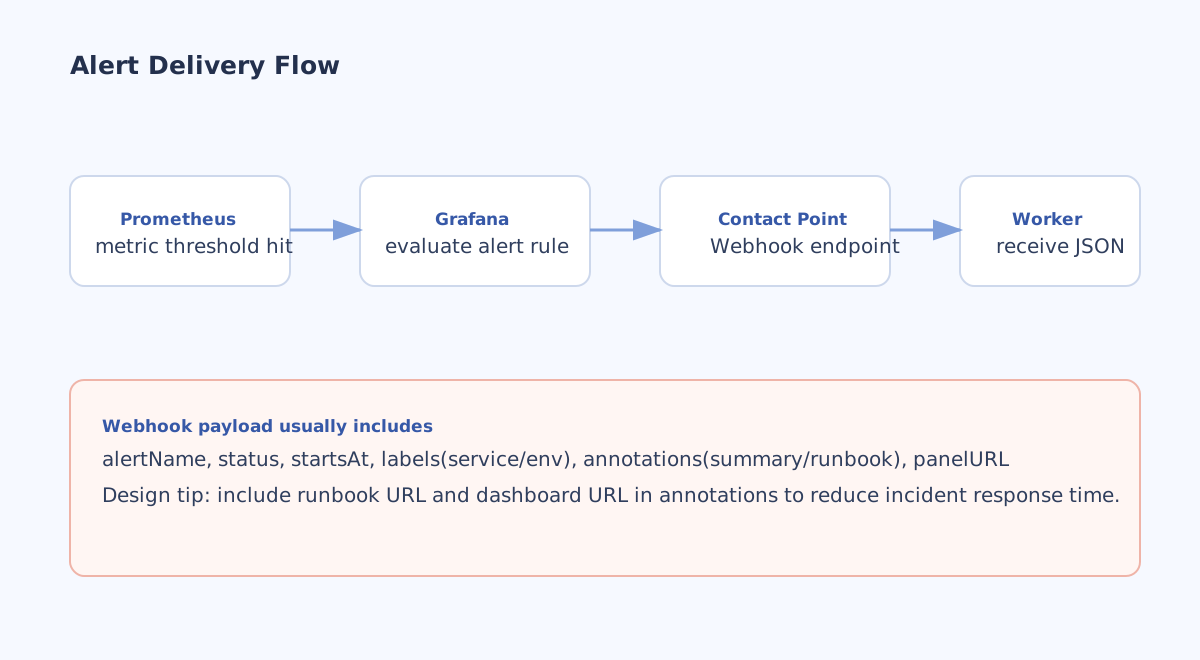
알람 품질 올릴 때는 이것들부터 챙기면 된다.
for시간으로 순간 스파이크 노이즈 줄이기severity라벨로 채널 분리- annotations에
runbook링크 포함 - 경보 후 조치 완료까지 걸리는 시간 추적
7) 운영 체크리스트
구축 직후에 바로 확인할 체크리스트:
- Prometheus가 scrape를 실제로 성공하는가
- Grafana 수치와 앱 로그의 방향성이 맞는가
- 알람 테스트를 수동으로 한 번 발생시켜 봤는가
/actuator가 외부에서 차단되어 있는가- runbook 링크가 알람 payload에 들어가는가
마무리
Prometheus + Grafana의 장점은 거창한 기능보다,
운영 기준선을 빠르게 세울 수 있다는 점이다.
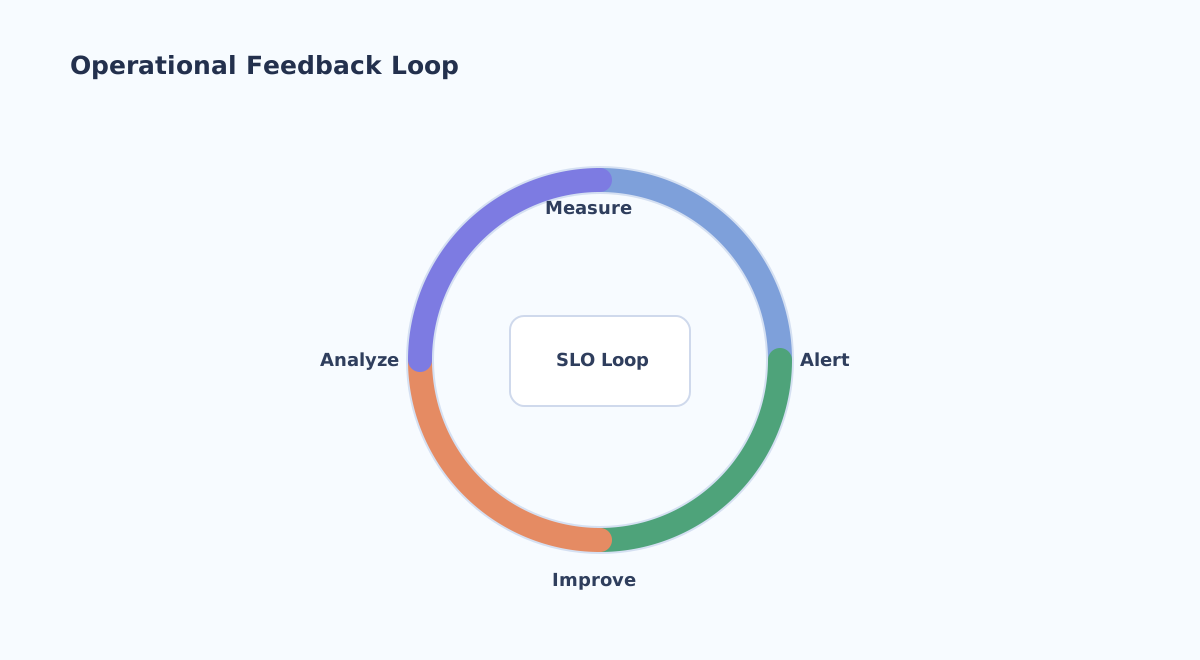
- 어떤 지표를 계속 볼지
- 어디서 알람을 울릴지
- 알람이 오면 뭘 먼저 볼지
이 세 가지만 팀 기준으로 맞춰도, 장애 대응 속도랑 품질이 꽤 안정적으로 올라간다.